
One record per unit.
From factory to field and every step between.
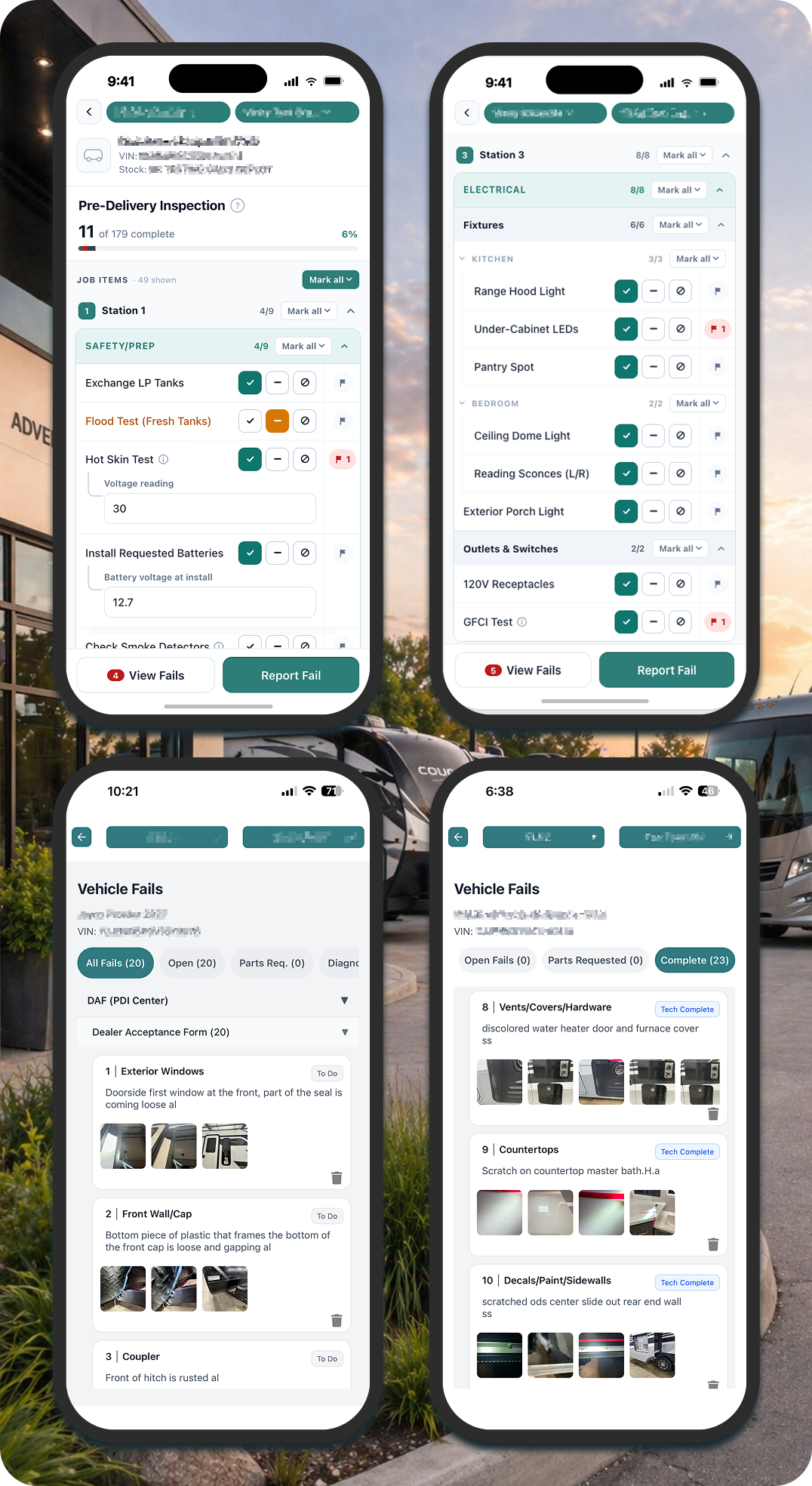
Check-in. PDI. Service. Delivery. Trade-in. Maintenance. Every time that unit is touched, vinny captures what happened, structured, photographed, tied to the VIN. One record that grows with the unit. Techs use it on a phone or tablet during the inspection they’re already doing. It doesn’t add a step. It structures the step that already exists.
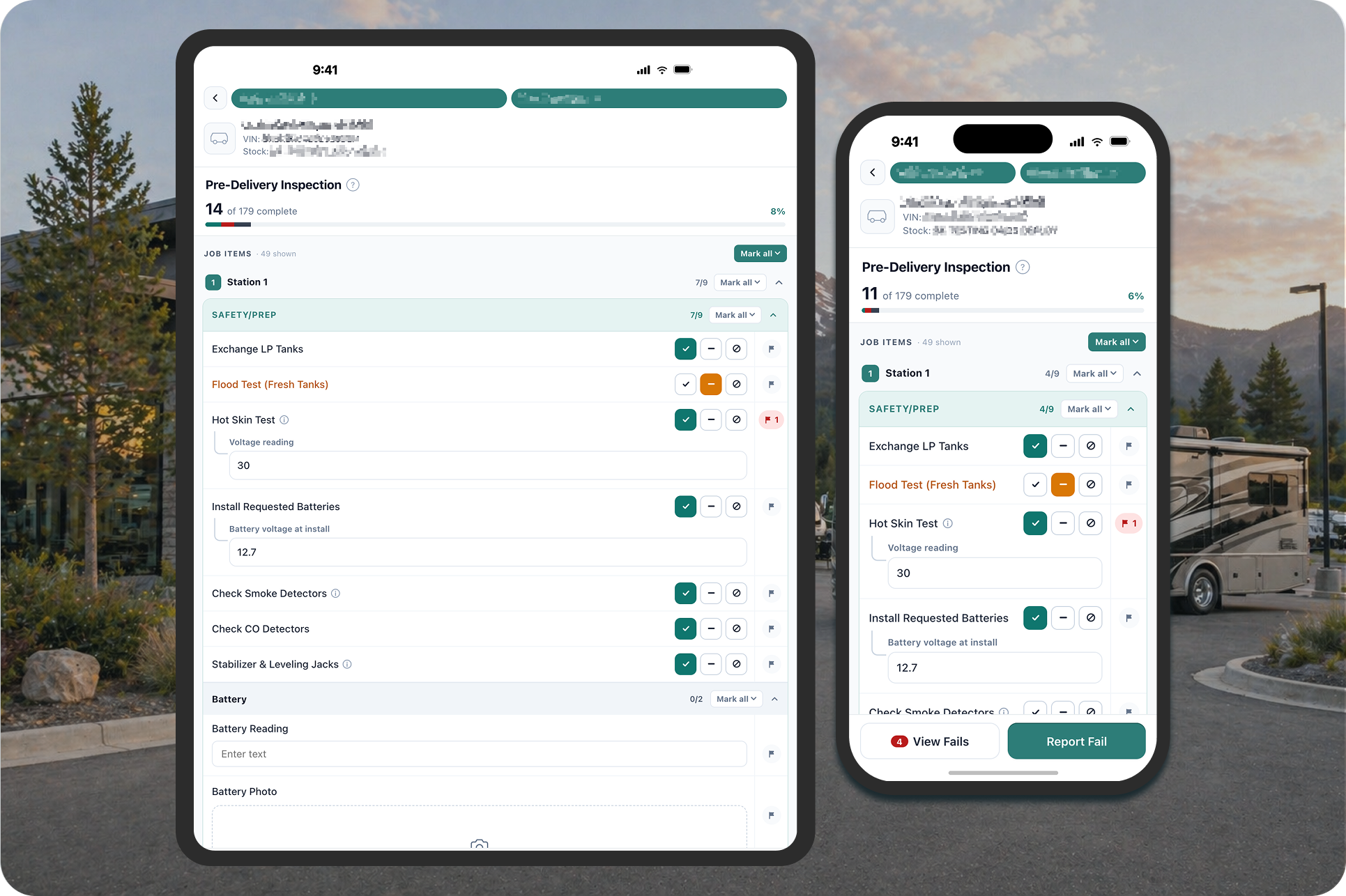
Step 1: Guide the Work
Scan the VIN. The right checklist loads: DAF, PDI, trade-in, service, or any custom workflow. OEM requirements built in.
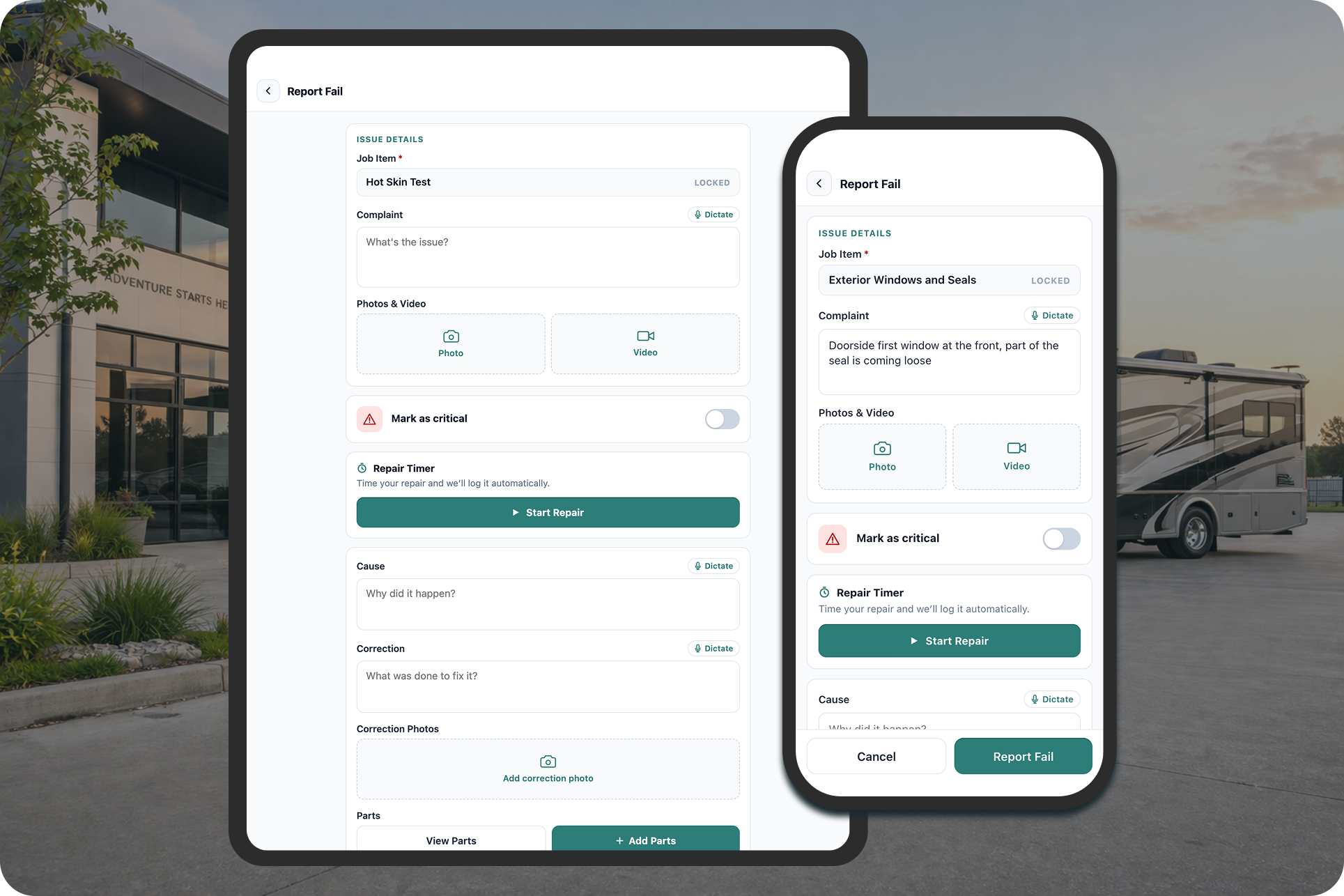
Step 2: Capture the Record
Findings, photos, video, talk-to-text, timestamps, signatures. Multiple techs on the same unit. Everything tied to the VIN at the point of inspection.
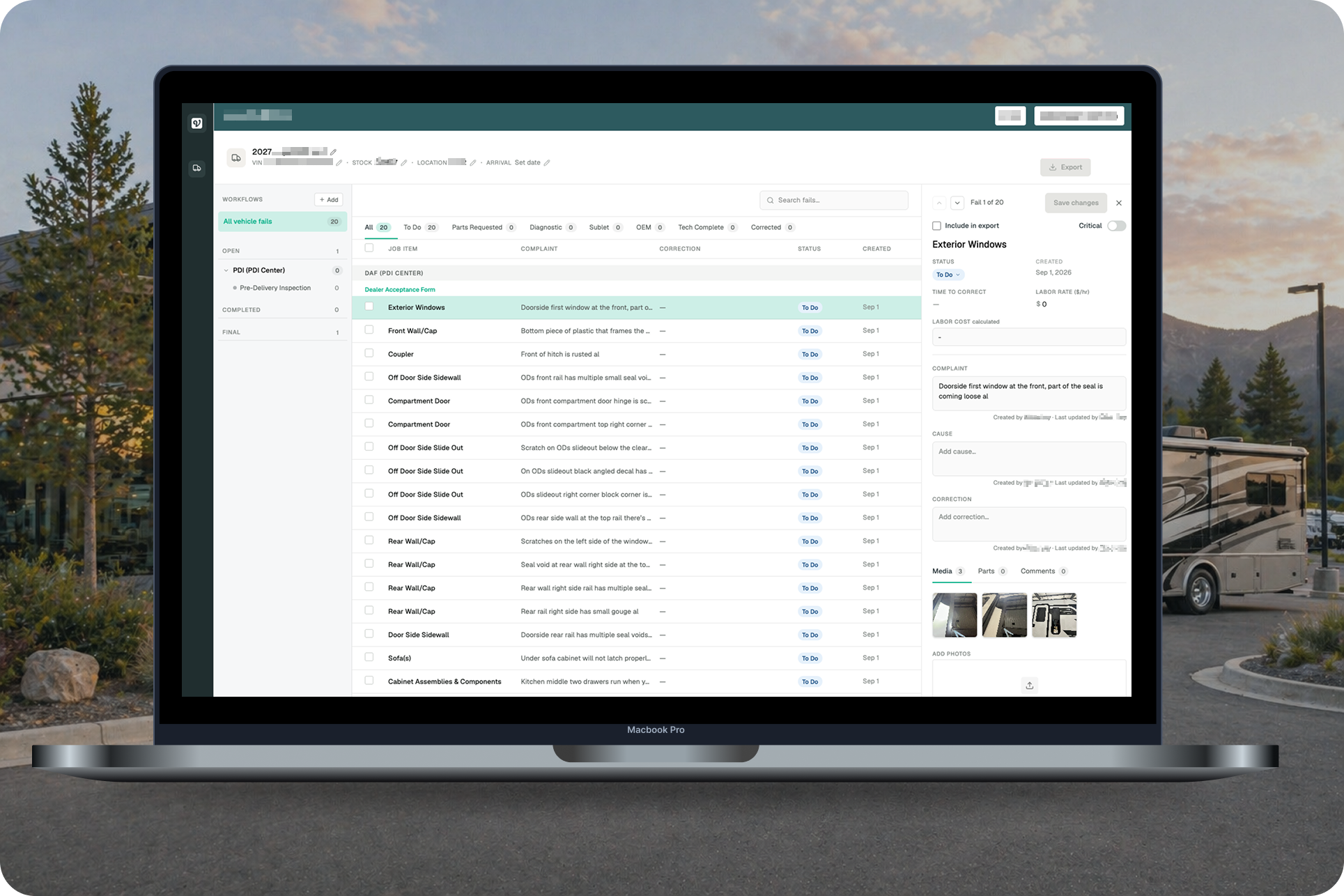
Step 3: Move the Information
Structured findings flow into RO exports, warranty portals, eDAFs, and internal handoffs. The record follows the unit, without being re-entered.
WHAT THIS LOOKS LIKE IN PRODUCTION
Multi-tech, same unit, same time
Two techs on one unit. No lockouts, no waiting, no ‘someone else is in that RO.’

Video Capture
Walk a defect, narrate it, attach it. A 10-second video says what three paragraphs won’t (and “hears” what a photo can’t).
Talk-to-text
Hands full, phone propped, talk through the finding. No typing (unless you want to).
Annotatable Photos
Circle it, arrow it, mark it up on screen. The photo tells the story without a paragraph.
Guided Checklists
(standard and expert)
New tech gets the full 400+ point walkthrough. Veteran gets the shorthand. Same standard either way.
OEM-Mapped DAFs
Each manufacturer’s requirements, built in. No looking up what one OEM wants versus another.
Digital Signatures
Driver, tech, manager. Timestamped. No chasing wet ink.

Repair Timer
Clock in, clock out. Labor time captured at the finding level, not estimated after the fact.
RO Export + Warranty Portal Submission
Structured findings packaged for your DMS and for direct OEM warranty portal submission. Transfer, don’t rebuild.

Unit P&L for Trade-Ins
Acquisition cost, reconditioning estimates, wholesale and retail valuation feeds where subscribed. Know what you’re getting into before you commit.
Reporting and Analytics
Category trends, user performance, time-to-completion, across every unit and location. The visibility you've been managing without.

Every Finding, Forever
Every photo, every note, every signature, every user, every unit, preserved and searchable, always accessible, right where you need it.

Unlimited users and units
No per-seat pricing. No per-unit caps. Add the whole team. Inspect every unit. The price doesn’t change.
THE UNIT LIFECYCLE
The record starts at check-in. It doesn’t stop there.
01
Check-in (DAF)
What arrived? What condition is it in? Documented before anything else happens.
02
Pre-Delivery Inspection (PDI)
400+ point guided checklist. What needs to happen before this unit is sale-ready?
03
Service & Repair
What was found, what was done, what’s still open. Repair timer. Parts. Labor. Photos.
04
Customer Delivery
Walkthrough documented. Sign-off captured. The customer’s ownership record starts clean.
05
Maintenance & Follow-Up
Scheduled service reminders. Ongoing condition documentation tied to the VIN.
06
Trade-In & Resale
Full condition history. Reconditioning P&L with wholesale and retail valuation feeds. Know what you’re acquiring before you commit.
Every finding, every photo, every signature, preserved and searchable. Always. One complete record for every unit that’s ever been on your lot.
Now imagine that record shared, permissions in place, across your team, your OEM partners, your component suppliers. No one guessing. No one starting from scratch. That's where this is headed.
Any Inspection.
Any Workflow.
Fully Customizable.
vinny ships with ready-to-use workflows for the most common inspection types. Need something different? We build custom workflows for OEM-specific requirements, regulatory compliance, or anything your operation needs.
-
Structured check-in mapped to OEM-specific forms
-
400+ point guided checklist with novice and expert modes
-
Continuous condition record for units moving between locations
-
Trade-in condition documentation with reconditioning P&L
-
Pre-show condition and post-show damage assessment
-
Delivery readiness confirmed and signed off
-
Multi-point documentation before and after repair
-
Mobile documentation for on-site warranty and repair work
-
Structured templates for state-specific mechanical disclosures, safety certifications, and condition-of-sale documentation with built-in archival (Connecticut's K-208, Wisconsin's Buyers Guide, etc.)
Need a custom workflow? Let’s build it together.
What Makes This Different
TRADITIONAL PROCESS
Unit information is scattered across paper, DMS text fields, phones, and memory
When a unit changes hands, the record doesn't follow. vinny creates one structured record per unit that compounds over time. The next person always has what they need. When the RO closes, the data goes with it. No aggregate view. No trends. No history.
WITH VINNY
vinny captures the dataset that didn’t exist
Structured finding categories, one record per unit across every inspection, mobile-first workflows, electronic DAFs mapped to OEM forms, and data that compounds over time.
Get Fully Operational in 3 Steps
We make onboarding easy.
STEP 1
Get Set Up
Upload your inventory. We configure your workflows. Invite your team.
STEP 2
Start Inspecting
Complete your first structured inspection. Adjust workflows as you go.
STEP 3
Scale & See the Data
Add users and units. Track trends, patterns, and performance in real time.
PRODUCTION DATA SNAPSHOT
eDAFs in Production Today
5,300+
Units Inspected
10,000+
Inspections Completed
~30
OEM Brands Accepting eDAFs
The data compounds over time. Every inspection adds to a cumulative quality dataset, category patterns, recurring items, time to sale-ready, that becomes more valuable the longer you use it.
Where We’re Headed
Today, vinny generates structured RO export files that give service writers a head start with findings, photos, categories, and documentation organized and ready to transfer into any DMS. Here's what we're building on top of that:
-
Unstructured inspection data translated into manufacturer-specific repair codes and flat rates. Traditional auto has Mitchell and AllData. RV doesn’t have an equivalent yet. We’re building it.
-
Claim-ready documentation assembled from inspection and repair data for submission to OEM portals.
-
Structured component data captured during inspection, building toward automated parts matching and procurement recommendations.